
OLT tab
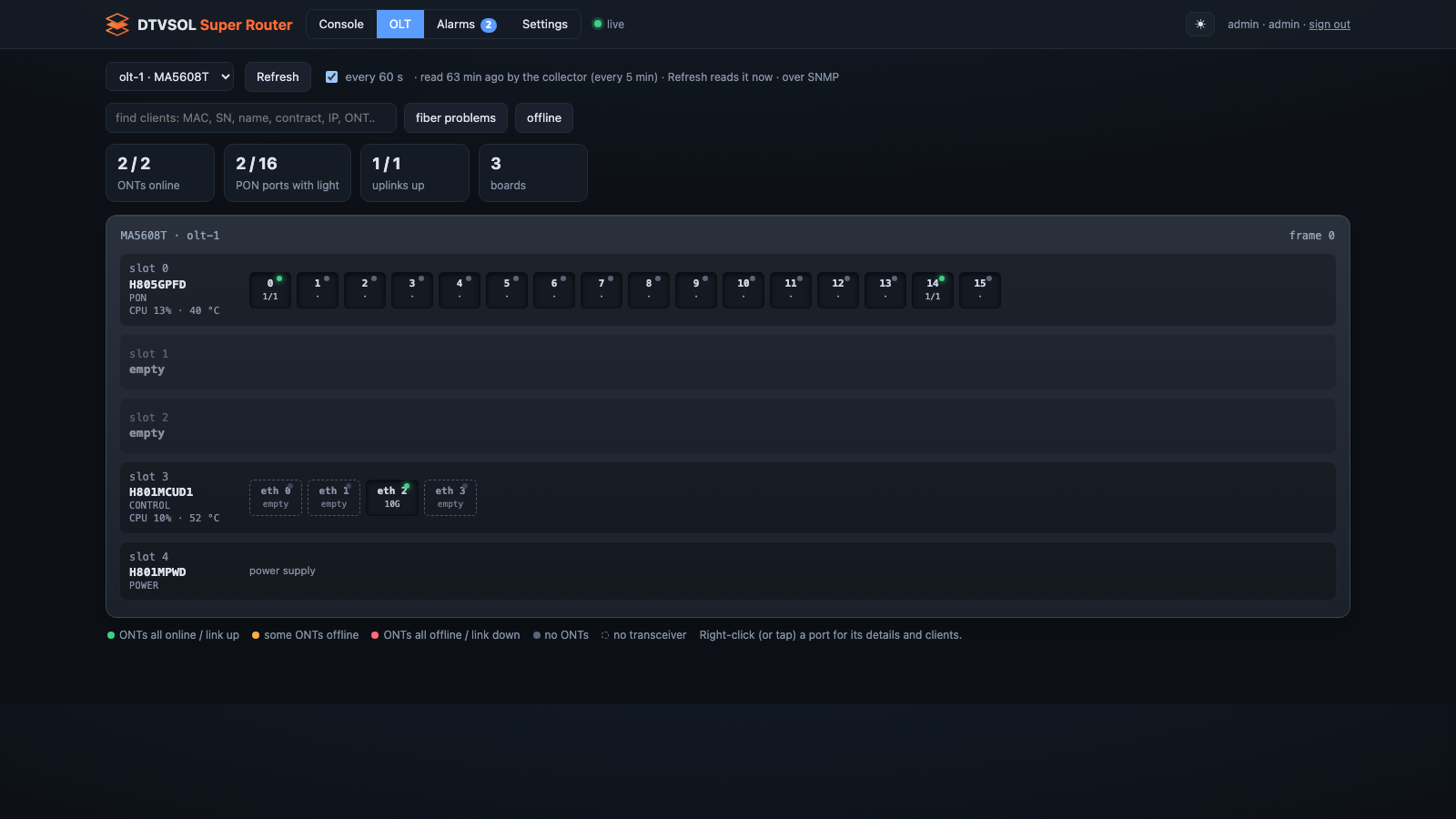
The OLT tab draws each registered OLT: its boards, its PON and Ethernet ports, and on every PON port the ONTs with the router’s service on each. It only reads. Nothing on this tab can change an OLT.
Where the data comes from
Section titled “Where the data comes from”Most of what you see is the collector’s last reading, taken every 5 minutes. The line next to the OLT list says how old it is. The page refreshes by itself every 60 seconds (every 60 s). Refresh reads the OLT now.
The summary and the chassis
Section titled “The summary and the chassis”At the top:
- ONTs online, out of all registered ONTs,
- PON ports with light,
- uplinks up,
- the number of boards.
Below, the chassis slot by slot, with each board’s role, status, CPU and temperature, and its ports. The port colours:
| Colour | Meaning |
|---|---|
| green | all ONTs online / link up |
| amber | some ONTs offline |
| red | all ONTs offline / link down |
| grey | no ONTs |
| dashed outline | no transceiver |
A port’s details
Section titled “A port’s details”Right-click a port (or tap it on a phone or tablet). A panel opens with:
- the port’s state, optics and counters;
- for a PON port, clients on this port: each ONT’s id, state, fiber level (what it receives), the customer (the router’s service or client), and the ONU model;
- the fiber history: the level every ONT receives, over 1 day, 7 days, 90 days or 2 years;
- the traffic graphs;
- for an uplink, the VLANs on this uplink and how each is carried.
Click an ONT to see its own fiber history. For an ONT that is offline, the panel shows the cause the OLT gave and when:
| Cause | Usually |
|---|---|
| dying gasp | the customer’s power went off |
| loss of signal | the fiber: cut, bent, or disconnected |
| loss of frame, signal fail, signal degrade | a poor fiber or connector |
Read configuration reads the port’s configuration from the OLT (read only). It takes a few seconds.
Fiber levels
Section titled “Fiber levels”The panel colours each ONT’s received level:
| Received level | Meaning |
|---|---|
| above −8 dBm | too strong: add attenuation |
| −8 to −25 dBm | good |
| −25 to −27 dBm | weak: check splices |
| below −27 dBm | too weak |
Find a customer
Section titled “Find a customer”The search box finds clients across the OLT by MAC, serial number, name, contract, IP address or ONT. Two buttons narrow the view:
- fiber problems: ONTs with weak, too weak or too strong light, or line errors;
- offline: ONTs that are offline.
Several OLTs
Section titled “Several OLTs”Pick the OLT in the list at the top. With no OLT registered, the tab says so:
register one with dtvsol olt add. See OLTs.